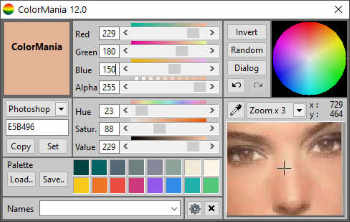
- RGB and HSV Sliders: Interactively adjust color coordinates with real-time gradient previews.
- Screen Magnifier & Color Grabber: High-precision onscreen eyedropper to capture any pixel from your desktop.
- Multi-Format Color Display: Instant conversion between HTML, Delphi, Photoshop, RGB565, and CSS RGBA.
- Web & HTML Standards: Integrated library of Websafe colors and predefined HTML Color codes.
- Palette Management: Save, organize, and manage custom color palettes for your design projects.
- AI-Refactored Engine: Completely modernized core for superior performance and future-proof stability.
- Intelligent Color Sorting: New "Sort by Similarity" algorithm and significantly improved sorting speeds.
- Expanded Color Library: 42 new professionally named colors added to the standard collection.
- Enhanced Transparency Support: Precise Alpha channel control (0-255) for modern UI and Android development.
- Optimized Resource Handling: Critical fixes for memory leaks and improved "Internet Reading" capabilities.
- Refined User Experience: Improved label captions, better keypress detection, and updated palette button displays.

ColorMania 15.0
Platform: Win 10/11
Size: 3565 KB
Type: Freeware
Download Now
Portable Version
Download Now
Support this project
ColorMania : Color Picker
Advanced Color Picker Utility
ColorMania is an advanced color picker for web designers, graphic artists and application developers.
It supports various color models and is able to pick colors from anywhere on your screen. Accuracy on pixel level is even made easier with the built-in screen magnifier.
Take the guesswork out of color selection and elevate your design process with ColorMania. Download now and experience the best in color management and customization for Windows.
• Building a website and want to get your colors right ?
• Working with graphics and need a detailed view ?
• Need accuracy in your work when identifying colors ?

With the color grabber you can pick any color on your screen and the screen magnifier makes this even easier for you. The RGB and HSL sliders allow you to manipulate these colors in detail and you can store the colors you want in your own custom color schemes or palettes.
ColorMania supports more color formats than any other color picker and can therefore be used in combination with a large number of other graphical programs (Photoshop, Gimp, Illustrator,..) and in different areas (web design, printing,...).
Features
ColorMania 15.0 supports a wide array of color spaces and code formats used across web, desktop, and embedded development:
- HTML Color Codes (Hex / CSS): The most common color code used in web design.
- Delphi Hex: Used with Borland's Delphi language.
- VB Hex: Used with Microsoft's Visual Basic.
- C++ Hex: Used with C++.
- RGB Values: Red/Green/Blue used in many paint programs.
- RGB% Values: Red/Green/Blue used in some DTP as well as paint programs.
- HSV Values: Hue/Saturation/Value-Brightness used in graphics programs.
- CMY: Cyan/Magenta/Yellow also used in paint programs.
- CMYK: Cyan/Magenta/Yellow/BlacK used in DTP and paint programs.
- HLS: Hue/Lightness/Saturation.
- Photoshop: Used in Adobe Photoshop color picker.
- Powerbuilder: Used in Powerbuilder development environment (Sybase).
- Android Transparent Format: Support for transparency/alpha channels.
- CSS RGBA Format: Modern web format including alpha transparency.
- RGB565: Optimized for embedded devices and microcontrollers.
New in this version
version 15.0 : March 2026
- AI refactoring
- Memory issue fixed (sorting Colors)
- Memory Leak fixed (Average colors)
- Improved file reading from Internet
- Sort colors speed improved
- better keypress detection
- Performance improvement Gradient creation
- Label Captions improved
- Fixed bug with Saturation value = 0 and refresh of scrollbar colors
- Add Color sort on similarity
- 42 named colors added
- Palette buttons and display changed
version 14.0 : July 2024
- Named color list expanded (100+ colors added)
- Hint on color dropdown fixed
- Color Name added on Palette hint
- Color Code follows selected Name added on Palette hint
- RGB565 Code included in Color Code displays
- Alpha Channel behavior slightly changed
version 12.1 : November 2020
- Option added to copy color code automatically to clipboard after grabbing
- Fixed bug in refresh Colorwheel
- Fixed refresh after dpi change
- default hints in palette removed
version 12.0 : June 2020
- Palette expanded to 16 colors
- Icon buttons modified
- High DPI issues fixed
- Font size issues fixed
- Performance strongly improved of color averaging
- Undo/redo handling improved
- Brightness slider from older version restored (switch between brightness/alpha)
- New shortcuts added for different layouts
- Check new version on startup added
version 11.0 : May 2020
- Brightness replaced by Alpha Channel
- Android Transparent Format Added
- CSS RGBA Format Added
version 10.1 : March 2020
- 64bit version
- Set text color to black/white/inverted color/contrast color features added
- better Color palette handling
- better responsiveness for color changes
- Color list expanded
version 10.0 : December 2018
- Color Dropdown restored to old version but improved, simply because it looks better.
- Expanded Color List added ( + 1400 named colors)
- UI improved for High Contrast view
- Color Palettes expanded to 12 slots
- You can switch between HTML colors and full Named color list
- New dropdown menu : Sort Color List by Hue, Saturation or Value, als R, G and B and finally also by Name
- Color updating procedures optimized (less cpu usage)
- New digital signature
• a full release history with changes is included with the program (readme.txt).
- AI refactoring
- Memory issue fixed (sorting Colors)
- Memory Leak fixed (Average colors)
- Improved file reading from Internet
- Sort colors speed improved
- better keypress detection
- Performance improvement Gradient creation
- Label Captions improved
- Fixed bug with Saturation value = 0 and refresh of scrollbar colors
- Add Color sort on similarity
- 42 named colors added
- Palette buttons and display changed
version 14.0 : July 2024
- Named color list expanded (100+ colors added)
- Hint on color dropdown fixed
- Color Name added on Palette hint
- Color Code follows selected Name added on Palette hint
- RGB565 Code included in Color Code displays
- Alpha Channel behavior slightly changed
version 12.1 : November 2020
- Option added to copy color code automatically to clipboard after grabbing
- Fixed bug in refresh Colorwheel
- Fixed refresh after dpi change
- default hints in palette removed
version 12.0 : June 2020
- Palette expanded to 16 colors
- Icon buttons modified
- High DPI issues fixed
- Font size issues fixed
- Performance strongly improved of color averaging
- Undo/redo handling improved
- Brightness slider from older version restored (switch between brightness/alpha)
- New shortcuts added for different layouts
- Check new version on startup added
version 11.0 : May 2020
- Brightness replaced by Alpha Channel
- Android Transparent Format Added
- CSS RGBA Format Added
version 10.1 : March 2020
- 64bit version
- Set text color to black/white/inverted color/contrast color features added
- better Color palette handling
- better responsiveness for color changes
- Color list expanded
version 10.0 : December 2018
- Color Dropdown restored to old version but improved, simply because it looks better.
- Expanded Color List added ( + 1400 named colors)
- UI improved for High Contrast view
- Color Palettes expanded to 12 slots
- You can switch between HTML colors and full Named color list
- New dropdown menu : Sort Color List by Hue, Saturation or Value, als R, G and B and finally also by Name
- Color updating procedures optimized (less cpu usage)
- New digital signature
• a full release history with changes is included with the program (readme.txt).
Awards
![]() |
![]() |
![]() |
![]() |


