
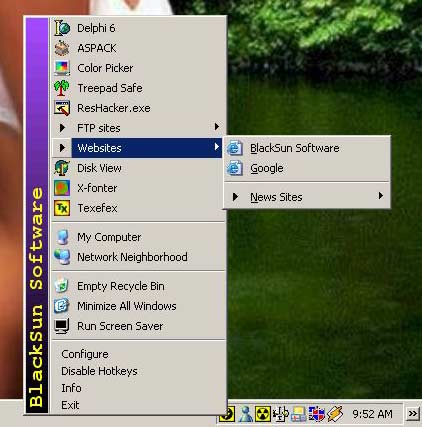
System Tray Application Launcher
The application launcher lets you jump to your favourite programs, files, folders, and internet links with just a mouse click. Beyond standard shortcuts, it also supports system commands (minimize all windows, Control Panel items, etc.) and ships with several built-in tools: Color Picker, Screen Magnifier, Character Map, Calendar Printer and more — all accessible from the system tray in one click.
Hotkey Macros & Text Automation
How often do you find yourself typing the same text over and over again? With FlashTray's keyboard macros you can let the program do the work for you — all you need to remember is a simple keyboard shortcut. It can act as a full boilerplate text manager, saving hours of valuable time each day. FlashTray also supports triggers: type an abbreviation like asap and it automatically expands to "as soon as possible". Macros are system-wide, so they work even when other programs are in focus.
Screen Highlighter
The screen highlighter lets you draw on top of anything on screen — just like a physical highlighter pen. Ideal for teachers during computer presentations or showing colleagues something specific. Define two separate pens with custom color, width, and opacity. One shortcut draws, another clears the screen. Custom macros can switch between pens.
Built-in Tools
FlashTray bundles several indispensable mini-utilities derived from other Blacksun products: the ColorMania color picker, the Magnifixer screen magnifier, and a character map rooted in X-Fonter. All of them live in the same tray menu, so you never need to hunt for a separate tool.
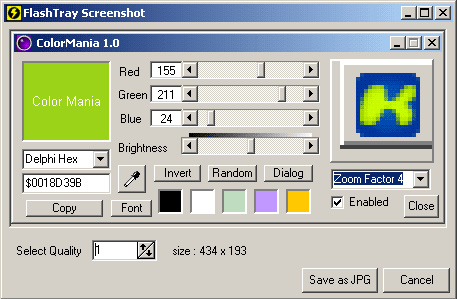
FlashTray includes a built-in screenshot maker. Capture the full screen or individual windows, preview the result immediately, and adjust the JPEG quality before saving.
| Feature | Included |
|---|---|
| Multi-Level Launcher (apps, files, folders, URLs, system commands) | ✓ |
| Hotkeys — system-wide keyboard shortcuts | ✓ |
| Extended Macro Language (no programming skills needed) | ✓ |
| Trigger-based text expansion (abbreviation expansion) | ✓ |
| Custom Appearance (small/large icons) | ✓ |
| Screen Highlighter with custom pens | ✓ |
| Horizontal lock on Screen Highlighter | ✓ |
| Screen-based screenshot maker (JPG) | ✓ |
| Window-based screenshot maker (JPG) | ✓ |
| Built-in Color Picker (ColorMania) | ✓ |
| Built-in Screen Magnifier (Magnifixer) | ✓ |
| Built-in Character Map | ✓ |
| Very small footprint — minimal resource usage | ✓ |