
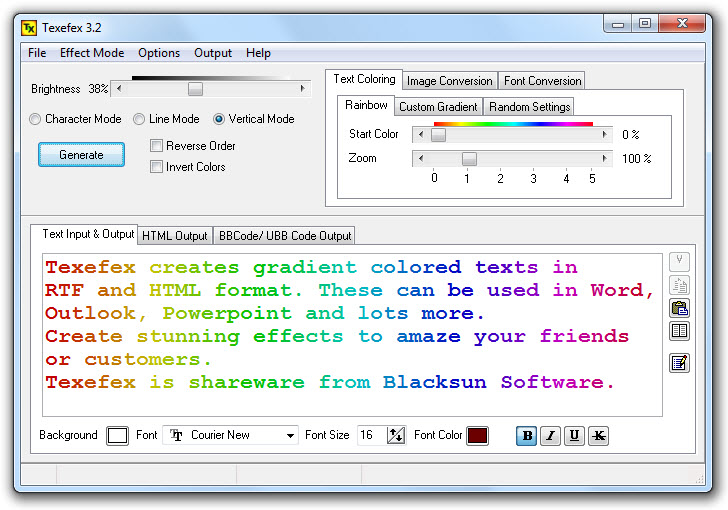
- Image to Text conversion — transform JPG, GIF and BMP images into ASCII art
- Create custom color schemes with up to 8 colors
- Adjustable Rainbow Scheme
- Random color, font or size option for varied results
- Character, Line and Vertical gradient modes
- Create TFX files to save and reload custom settings
- Adjustable Brightness
- RTF and HTML output with live HTML Preview
- Randomize character selection
- Select characters by light factor (colored or uncolored)
- Easy setup with uninstall support
Texefex is a lightweight Windows utility that turns ordinary text into colourful gradient art. Instead of manually colouring each character in a word processor, Texefex applies smooth multi-colour transitions across your text automatically — character by character, line by line, or as a full vertical gradient.
You choose from rainbow presets, define a custom palette of up to eight colours, or let Texefex randomise the scheme for you. The result is a styled block of text you can paste directly into a Word document, email, website, or forum post — no graphic design skills needed.
Texefex also doubles as an ASCII art generator: drop in any JPG, GIF or BMP image and it converts the picture into text characters, mapping pixel brightness to character density. The output can be coloured or monochrome, and works in any fixed-width font.
- Type or paste your text — any length, from a single word to an entire paragraph. Choose your font and size.
- Pick a colour scheme — select Rainbow, create a custom gradient with up to 8 colours, or hit Randomize for a surprise palette.
- Choose a gradient direction — Character mode colours each letter individually, Line mode blends across lines, and Vertical mode creates a top-to-bottom gradient.
- Adjust brightness and contrast — fine-tune the result with the brightness slider until the colours look exactly right.
- Export — copy as RTF for Word, Outlook or PowerPoint; as HTML for websites; or as BBCODE for forum posts. Preview the HTML output live before exporting.
This is real HTML output from Texefex — each character individually coloured with inline CSS. No images, no tricks.
Integrate unique gradient text art that draws attention and improves visual appeal on any webpage.
Create eye-catching posts that stand out on Instagram, Facebook, and other platforms.
Make posters and flyers pop with creative text effects that leave a lasting impression.
Use BBCODE output for forum posts and RTF output for styled emails and Office documents.